Web Scraping
How to Data Scrape a Website Safely and Effectively (Step‑by‑Step Guide)
How to Data Scrape a Website Safely and Effectively (Step‑by‑Step Guide)Web Scraping
What "data scraping a website" actually means
Data scraping - also called web scraping or web data extraction - is the automated process of using software to extract data from websites instead of copying information by hand. A web scraper visits web pages, reads their HTML, pulls out the fields you care about, and saves everything into structured data formats like a csv file or JSON. It can extract millions of data points quickly, turning messy internet content into clean, analysis-ready datasets.
The use cases in 2024–2026 are everywhere: tracking real estate listings for price monitoring, scraping e commerce websites to benchmark competitor pricing, collecting SaaS feature matrices for market research, and gathering data from B2B directories for lead generation. If a company publishes textual data on the web, someone is probably scraping it.
Undetectable.io operates in cybersecurity and privacy, focusing on anti-detection and multi-account management rather than selling web scraping tools directly. That said, its anti-detect browser is frequently used alongside data collection workflows because it solves fingerprint, proxy, and profile challenges that scrapers face daily.
This article is a practical guide on how to data scrape a website for beginners and intermediate users. You will learn both no-code and coding paths, legal and ethical boundaries, anti-bot countermeasures, and how to scale reliably.
Before you start: legality, ethics, and website rules
Web scraping is legal under certain guidelines, but it is not a free-for-all. Before you scrape a single page, you need to understand the laws, terms of service, and privacy regulations that apply.
The term "publicly available data" does not automatically mean you can extract information at industrial scale. Most sites publish a robots.txt file, rate limits, and terms of use - many updated between 2023 and 2025 - that restrict automated access. Respecting a site's robots.txt file is essential to ensure compliance when scraping. Violating a website's terms of service can lead to legal action, including a cease and desist letter or lawsuits.
Examples of risky behavior include:
- Scraping behind login walls without permission
- Harvesting personal emails or phone numbers for cold outreach without consent
- Bypassing paywalls or ignoring explicit "no scraping" clauses
- Collecting data that falls under copyright laws without authorization
In the U.S., the Computer Fraud and Abuse Act can apply to unauthorized scraping. In hiQ Labs v. LinkedIn, the Ninth Circuit concluded that accessing publicly available LinkedIn profiles was unlikely to constitute access “without authorization” under the CFAA. However, the decision did not establish that all scraping of public data is lawful, and other legal claims involving contracts, privacy, copyright, or data misuse may still apply.
In Facebook v. Power Ventures, the Ninth Circuit ruled in 2016 that continuing to access Facebook's password-protected systems after Facebook had explicitly revoked authorization could violate the CFAA. The case involved authenticated access and a cease-and-desist notice, not merely the scraping of publicly accessible Facebook pages.
In the EU, publicly available personal data remains subject to the GDPR. Organizations need an appropriate legal basis for processing, which may be consent, legitimate interests, contractual necessity, or another basis under Article 6. They must also comply with transparency, purpose-limitation, data-minimization, and data-subject-rights requirements. Web scraping may violate a website's terms of service, so always check before you begin.
Practical best practices:
- Throttle requests and add randomized delays
- Honor robots.txt where appropriate
- Avoid sensitive personal data unless you have clear legal grounds
- Document your data sources (URLs, timestamps, schema) for compliance and auditability
Undetectable.io does not encourage violating websites' rules. Its role is privacy protection, fingerprint management, and multi-account handling for legitimate use cases like marketing research, QA testing, and ad verification.
How web scraping works: core concepts in plain English
Web scraping generally follows a standard step-by-step lifecycle: download a page, parse its HTML, extract the fields you need, clean the values, and save structured data. A typical web scraping workflow includes sending a request, parsing HTML, and extracting data - repeated across hundreds or thousands of URLs.
There are two main components. The web crawler (or spider) discovers and iterates URLs - for instance, it might collect urls for all the links on an online electronics store's category pages. The scraper then opens each URL, performs html parsing, and uses locators like css selectors or XPath to find specific elements such as titles, prices, and images.
The basic technical steps work like this: your script sends http requests (GET) to the target website. The server returns HTML, including CSS and javascript references. You use a DOM parser to locate desired data, normalize and clean values, then export to a csv file, a database, or google sheets. Effective web scraping processes include sending an HTTP request to the target server, and extracted data is typically cleaned and structured for storage and analysis. Storing extracted data in structured formats facilitates easier analysis.
An important distinction: static sites deliver all content in the initial HTML response, while dynamic sites load data via JavaScript and AJAX calls. The latter require a real browser or automation tool like Playwright, Selenium, or an anti-detect browser profile to render content before extraction.
Common use cases include market research (scraping competitor pricing from search engines and category pages), real estate listings (extracting addresses, prices, and square footage from property portals), and lead generation (collecting company names, roles, and website URLs from public directories).
Choosing your approach: no‑code tools vs. coding your own scraper
The first decision is straightforward: do you want to click around a browser, or are you comfortable writing code? Web scraping can be performed using coding or no-code solutions depending on the user's expertise, and both methods can scrape data effectively.
No-code / low-code tools include point-and-click browser extensions and cloud platforms. The typical workflow is: open a page, click repeating elements (product titles, for instance), define a pattern, then run over multiple pages and export. No-code scraping tools have become increasingly popular for users without programming skills. No-code tools allow users to scrape data without programming. Web Scraper can export data in CSV, XLSX, and JSON formats. Data Miner offers over 60,000 data extraction rules. These are ideal for one-off data collection, small projects, and non-developers.
- Pros: no coding required, quick setup, built-in CSV export
- Cons: limited control for complex login flows, rate limiting, or sites that frequently change HTML structure
Coding your own scraper means using programming languages like Python or JavaScript. Python's BeautifulSoup library is popular for web scraping and great for beginners. Scrapy is an open-source framework for advanced web scraping and large datasets. Tools like beautiful soup and Scrapy are commonly used for web scraping in Python. Selenium and Playwright are used for scraping dynamic content from JavaScript-heavy websites.
- Pros: flexible, handles authentication, custom rotation logic, api usage, and large-scale pipelines
- Cons: needs coding knowledge, maintenance when websites change, DevOps overhead
Undetectable.io can sit under either approach as the browser layer, providing fingerprint protection and multi-account testing when sites deploy advanced bot and fingerprint checks, and you can download Undetectable to run these workflows on your desktop.
Step‑by‑step: how to scrape a simple website into a CSV file
Let's walk through a concrete example. Imagine you want to scrape a public "Top 100 SaaS Tools" page that lists each tool's name, category, and URL. Identifying targeted data requires defining the specific information needed and gathering URLs before you write a single line of code.
Step 1 - Inspect the page. Open browser DevTools (Chrome or Firefox), right-click an element, and select "Inspect." Identify repeating patterns: table rows, list items, or div cards. Note the css selectors or attributes - for example, .tool-card > h2 for the name, .tool-card .category for category, and .tool-card a for the URL. This process is the same whether you are using a no-code tool or writing a script.
Step 2 - Pick a tool. For no-code, install a reputable scraping extension, open the page, and click the repeating elements to define your pattern. For code, create a short Python script: use requests to fetch the URL, then BeautifulSoup to parse the HTML and loop over each .tool-card, pulling .text and .get('href') for each field.
Step 3 - Extract and clean. Extract text for each field, trim whitespace, convert numbers (e.g., "1,234,567" → 1234567), and standardize formats. Handle missing fields gracefully - don't let one broken entry crash your entire run.
Step 4 - Export. Map each record into columns ("name, category, url") and save to a csv file with UTF-8 encoding. Include a header row so the output is immediately usable in google sheets or any spreadsheet tool.
Save the raw HTML alongside your CSV. If selectors break later due to a layout change, you can re-parse from saved files instead of re-scraping.
Scraping more complex sites: search, pagination, and JavaScript
Simple single page scraping is rarely enough. Most real projects involve search engines, filtering, and multiple pages of results.
Handling pagination. Detect "Next" links or predictable URL patterns like ?page=2, ?page=3. Loop through pages until there is no next button or an HTTP 404 response. Keep track of page-size vs. overall item limits to stay within reasonable data collection bounds. Many websites provide APIs which are often more stable than scraping methods - check the network tab in DevTools for hidden API endpoints before building complex pagination logic.
Scraping behind search forms. For instance, searching real estate listings for "2 bedroom apartments in Berlin" means either sending POST or GET requests that mimic the form, or using browser automation to fill and submit forms repeatedly. Inspect the network tab to see what the form actually sends.
JavaScript and AJAX content. Infinite scroll and "Load more" buttons are everywhere. Scraping dynamic sites requires handling JavaScript execution. Headless browsers like Playwright or Puppeteer can wait for network calls to complete, then extract the fully rendered HTML. Sometimes the data sits inside embedded JSON blobs (e.g., NEXT_DATA on Next.js sites), which you can parse directly - faster and cleaner than rendering.
Frames and iFrames. Some content lives inside an embedded frame. Your scraper must switch context or send requests directly to the frame's source URL. Common challenges in web scraping include handling CAPTCHAs and changing page layouts, so build resilience into every step. Web scraping can face issues with website layout changes, which means your selectors may need regular updates.
Dealing with anti‑bot systems, IP blocks, and fingerprinting
Many websites use bot-detection systems to prevent automated scraping activities. By 2025, major sites layer multiple defenses: rate limiting (429/503 responses), CAPTCHAs and "are you human?" challenges, IP reputation databases that block datacenter ranges, and browser fingerprinting that correlates canvas, WebGL, fonts, and hardware across sessions. A 2026 research study found that about 37% of surveyed sites use Cloudflare bot protection alone.
Automated scraping can lead to IP bans from websites. Managing proxies is a common technical challenge in scraping, so choosing reliable high-anonymity proxy services is critical for stability and geolocation coverage. Here are practical mitigation strategies that stay within legal and ethical limits:
- Randomized delays and human-like browsing patterns (vary click timing, scroll naturally)
- Rotating residential or mobile proxies from reputable providers instead of datacenter IPs, and periodically testing your setup on BrowserLeaks.com to detect IP, DNS, and fingerprint leaks
- Limiting concurrency and respecting target infrastructure - don't hammer a site with hundreds of parallel requests
- Spoofing headers like User-Agent, Accept-Language, and Referer to match real browser patterns
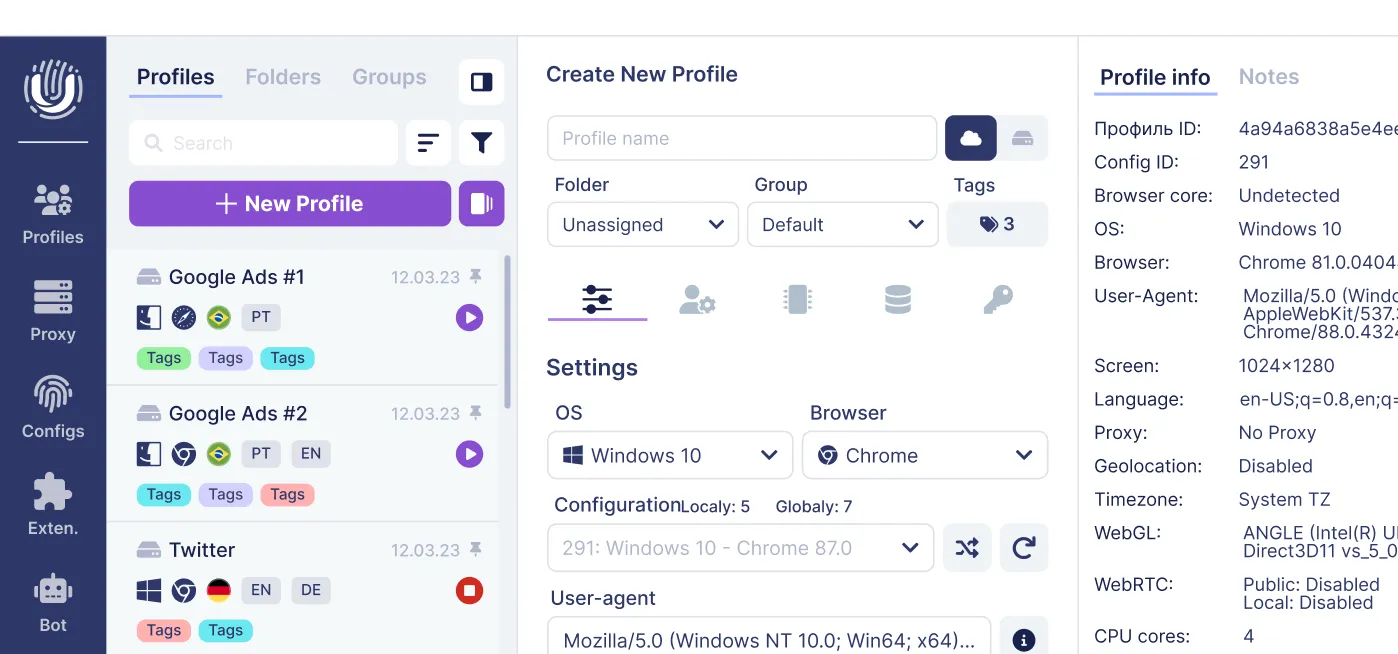
Anti-detect browsers like Undetectable.io address the fingerprint layer specifically. Each profile gets a unique, realistic browser fingerprint - user agent, timezone, screen resolution, fonts, and more - so that the target website sees what appears to be a normal user. Local profiles prevent sensitive data from leaving your device. Profile warming via cookies bots makes profiles look like real, long-lived users before automation touches them.
Using such tools does not grant permission to ignore terms of service. The purpose is to help legitimate users avoid false positives and unnecessary blocks when running campaigns, QA tests, or data collection at reasonable scale.
Practical examples: real estate listings, market research, and lead generation
Here are three mini-blueprints showing web scraping applications in action.
Example 1 - Real estate listings. Real estate data scraping helps in appraising property values and tracking market trends. Fields to extract: property ID, address, price, number of bedrooms, square meters, listing date, and agent URL. By scraping daily and comparing snapshots, you can estimate price trends or vacancy rates in cities like London, Berlin, or New York. One case involved a firm scraping 4 million UK listings from multiple portals, tracking 34 structured fields including price history and EPC ratings.
Example 2 - Market research on competitors. Price intelligence is a major web scraping use case. Scrape product catalogs or pricing pages of SaaS competitors to track new features added to pricing tables over specific months ("feature X appeared in March 2025"). Web scraping aids in market research and competitor monitoring. Combine scraped data with your internal analytics to guide product roadmap and positioning. Web scraping supports brand monitoring and reputation management as well - monitor review sites and social mentions.
Example 3 - Lead generation. Lead generation can be enhanced through web data extraction from public business directories or event attendee lists. Extract company name, role, LinkedIn URL, and website. Do not scrape personal contact details like private emails when prohibited - integrate only with compliant outreach workflows that respect online services' terms and local privacy laws.
All of these end up in a csv file or google sheets for filtering, scoring, and importing into CRM tools. Undetectable.io users - affiliate marketers, e-commerce sellers, social media managers - often pair multi-account profiles with these scraped datasets to test different ads, landing pages, or offers safely across many websites.
Scaling up: automation, scheduling, and data quality
Real value appears when web scraping is reliable and repeatable, not just a one-time export. Treat your scraper like any other data pipeline.
Automation patterns. Use cron jobs, task schedulers, or CI pipelines to run scrapers hourly, daily, or weekly. Store results in a database or data warehouse (PostgreSQL, BigQuery, Snowflake) rather than just spreadsheets. This transforms time consuming manual exports into always-fresh large datasets.
Monitoring and data quality. Add checks for missing fields, suspicious spikes or drops, and duplicate records. Log HTTP status codes and error rates - alert on repeated 403/429 codes that signal blocking. Monitoring for site changes is necessary to maintain effective web scraping workflows, because even minor HTML updates can break your selectors overnight.
Versioning. Keep scraper code under version control (Git) and maintain change logs when you update selectors or parsing logic. Save HTML snapshots so you can debug parsing failures after a site redesign.
How Undetectable.io supports scaling. Its unlimited local profiles and API let teams assign different profiles to different scraper tasks or markets. Sync key cookies or sessions across machines while keeping fingerprint separation clean for each workload. This means companies can scale web harvesting across geographies without profile collisions or detection spikes, choosing from Undetectable.io pricing plans for teams of different sizes.
Security, privacy, and using Undetectable.io responsibly
Poorly built scrapers can leak credentials, expose IPs, or violate user privacy. Security-first thinking is not optional.
Security best practices:
- Never store passwords or api keys directly in scripts - use environment variables or secret managers
- Use HTTPS everywhere, validate certificates, and avoid unknown third-party proxy vendors that may log traffic
- Rotate credentials regularly and audit access logs
Privacy safeguards:
- Do not log full session cookies unnecessarily
- Anonymize or pseudonymize data where possible, especially if it includes user-generated content or identifiers
- Limit data retention - only keep what you actually need for analysis
Undetectable.io's architecture aligns with these principles. Local profiles mean scraping-related browser data stays on your device, not on shared cloud infrastructure by default. Teams can opt into private cloud storage if needed, but retain control and separation between projects.
Undetectable.io is designed for anonymity, multi-account management, and anti-detection for legitimate operations like ad testing, traffic arbitrage, QA, and data science research. This article explicitly discourages abusive scraping, credential stuffing, or terms-violating behavior. Always consult your own legal counsel and internal compliance teams when designing large-scale web data collection projects.
Summary: turning scraped data into real business value
Here is a concise recap of how to data scrape a website effectively:
- Understand legal and ethical boundaries - check ToS, respect robots.txt, know computer fraud statutes
- Start simple - inspect HTML and scrape one page to CSV
- Grow into complexity - handle search, pagination, and JavaScript-rendered content
- Plan for anti-bot defenses - manage IP strategy, proxies, and fingerprints
- Automate, monitor, and secure your scraping pipeline for long-term reliability
Raw data scraping is only step one. The real value comes from analysis: price intelligence dashboards, market research reports, lead lists integrated with sales workflows, and real estate or financial models built on historical scraped data.
Pairing robust web scraping practices with tools like Undetectable.io helps professionals operate more safely and reliably when they need multiple browser identities, strong anonymity, and repeatable automation. As AI models in 2025–2026 rely more heavily on large, high-quality datasets, responsible web data collection will become an even more critical competitive skill. Start with a single page, prove the value, then scale from there.
Related posts
View all articlesJoin 450,000+ users who chose Undetectable
- Advanced anti-detection technology
- Unlimited local profiles from $49
- The perfect solution for multi-accounting