Browser Fingerprints
Browser Leak: How Your Browser Reveals You (And How Undetectable.io Helps)
Browser Leak: How Your Browser Reveals You (And How Undetectable.io Helps)Browser Fingerprints
Every time you open a web browser, it sends dozens of signals about your device, network, and identity to every website you visit. A browser leak is what happens when that data escapes despite your best efforts to stay private.
What is a browser leak?
A browser leak means your browser reveals identifying information-your real ip address, dns queries, hardware profile, or fingerprint data-even when you think you are protected by a vpn, proxy, or incognito mode. A browser leak exposes sensitive personal information unintentionally, and а browser or network misconfiguration may allow websites to discover an IP address that the user intended to hide, for example through IPv6 routing, WebRTC candidates, or an incorrectly configured proxy.
The main categories include ip address leaks through HTTP headers, dns leaks that expose your browsing activity, webrtc leaks that bypass encrypted tunnels, and browser fingerprint exposure that can identify a device across sessions. Modern browsers like Google Chrome, Mozilla Firefox, Edge, and Safari all expose some combination of these data points by default in 2026.
For anyone managing multiple online accounts-traffic arbitrage teams, social media managers, e-commerce sellers-these leaks are not theoretical. They trigger account flags, bans, and blocked ad campaigns on platforms like Meta, Google, and TikTok.
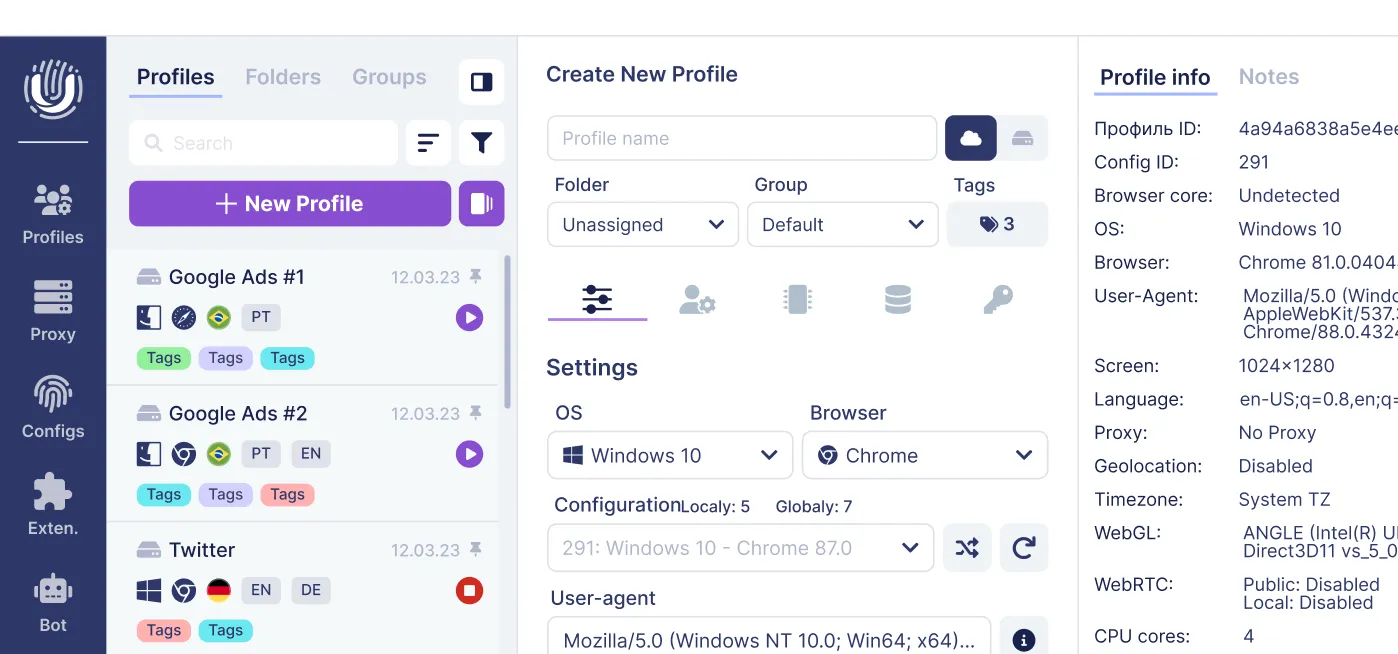
Undetectable.io is an anti detect browser built to control and minimize these leaks. It lets users create many isolated profiles, each with its own fingerprint, proxy, and storage, so that no two accounts look like the same device.
How browser leaks happen in real life
Picture a 2025 Facebook ads arbitrage campaign. A team rotates residential proxies across five ad accounts, each on a different ip. Despite the rotation, all five accounts get flagged within a week. The reason: every session presented the same browser fingerprint-same screen resolution, same installed fonts, same WebGL renderer, same system language. The proxy changed the ip address, but the browser itself looked identical every time.
This happens because your browser sends a rich set of signals on every page load. JavaScript APIs expose your operating system, cpu cores, device memory, language settings, timezone, and graphics card details. Network-level features like WebRTC discover public ip addresses and local IPs through STUN servers, while dns queries can route outside your vpn tunnel to your ISP's resolvers.
These leaks persist even with a paid vpn, HTTPS encryption, and incognito mode enabled. Incognito mode does not fully protect against browser leaks-it clears cookies and history after the session, but your hardware profile and network behavior remain unchanged. Browser fingerprinting can track users across sessions without cookies, which is exactly what anti-fraud engines exploit.
The process is entirely passive. Users never opt in. Tracking scripts, ad networks, and risk engines consume this leaked data silently, building a long-term digital identity that links separate accounts, IPs, and sessions back to one device.
Key types of browser leaks you must test
A serious browser leak test must go beyond checking your public IP. Browser leak tests check 20+ privacy vectors, covering network-level exposure and deep fingerprint attributes that most "quick VPN checks" ignore entirely.
The main categories are: WebRTC ip leaks, where web real time communication APIs expose your real public ip or local network address; dns leaks, where domain resolution requests escape your encrypted path; IP/HTTP header leaks, where your real ip appears in request headers; and browser fingerprint leaks, where the combination of canvas fingerprinting, WebGL output, installed plugins, screen size, and dozens of other attributes creates a unique fingerprint.
Many tools from 2024–2026 only check the public ip and miss canvas hash differences, audio fingerprints, and hardware mismatches between your spoofed profile and actual device. BrowserLeaks tests detect IP, DNS, and WebRTC leaks in a single dashboard. Whoer analyzes IP, DNS, and WebRTC leaks in real-time and gives an overall anonymity score.
For Undetectable.io users, the critical step is running browserleaks tests on each profile to confirm the spoofed fingerprint is consistent, realistic, and not obviously contradictory. Each leak type below gets its own detailed section.
WebRTC IP leaks: when your browser bypasses your VPN
WebRTC (web real time communication) powers voice calls, video chat, and file sharing directly in desktop browsers like Chrome, Firefox, Edge, and Safari. To establish peer-to-peer connections, it must discover your network addresses-and that discovery process is where the leak happens.
WebRTC creates peer connections that bypass VPN tunnels by contacting STUN servers outside the encrypted path. Those servers return your real ip address, sometimes both your local network address and your real public ip. WebRTC can expose your real IP address even with a VPN active. In a browser leak test, this looks like your home or office IP appearing right alongside the VPN/proxy IP in the WebRTC results panel.
The scale of this problem is significant. Research shows that more than 23% of tested VPNs leak IP addresses through WebRTC. A 2025 cross-platform study found that Chrome was the most vulnerable browser, leaking LAN and CGNAT addresses on both mobile and desktop. The tor browser prevented all WebRTC leaks entirely.
WebRTC leaks can reveal both local and public IP addresses, which is devastating for multi-account workers: the real ip can tie supposedly separate profiles together across platforms.
Practical fixes: in Firefox, set media.peerconnection.enabled to false in about:config. In Chromium-based browsers, use flags or privacy extensions to disable WebRTC. Disabling or restricting WebRTC can prevent WebRTC-based address exposure, but it does not protect against other IP, DNS, IPv6, proxy, or routing leaks. In Undetectable.io, each profile can be configured with WebRTC controls and paired with a proxy so that your real ip never surfaces in a leak test.
DNS leaks: when your ISP still sees everything
A dns leak occurs when dns queries bypass the VPN tunnel and go to your ISP's resolvers instead of staying inside the encrypted path. DNS leaks expose your browsing history to your ISP-every domain you visit (facebook.com, ads.google.com, tiktok.com) becomes visible, even when your traffic content and ip address are protected.
Imagine you are running campaigns through a residential proxy with an IP in New York. You run a dns leak test and discover your dns queries are resolving through Comcast servers in Philadelphia-your actual ISP. That mismatch is exactly the kind of signal anti-fraud systems use to flag accounts. Your ISP can see every website you visit during a DNS leak, and vpn providers that fail to enforce own dns settings leave users exposed.
Common causes include misconfigured vpn clients, Windows or macOS system-level resolvers that ignore the vpn tunnel, IPv6 queries that route outside the tunnel, and browser DNS-over-HTTPS (DoH) pointing to Google (8.8.8.8) or Cloudflare (1.1.1.1) instead of the VPN's servers. In studies, about 10% of tested VPNs leaked DNS data to ISPs.
Fixes: enable DNS leak protection in your VPN app, set system DNS to privacy-focused resolvers aligned with your proxy exit location, disable IPv6 when needed, and run a DNS leak test after every network change. DNS queries should go through your VPN's DNS servers-always verify this. For Undetectable.io teams, standardize DNS settings across all profiles to avoid mismatches that websites track.
Browser fingerprinting: the silent browser leak
A browser fingerprint is the combination of dozens of data points-screen resolution, operating system, system fonts, system language, WebGL renderer, canvas hash, timezone, and more-that together create a nearly unique identifier for your browser. According to EFF's Panopticlick research, 83.6% of browsers have unique fingerprints, and 99.24% of users can be uniquely identified by fingerprints when enough attributes are measured. Over 10,000+ sites use fingerprinting for tracking today.
Canvas fingerprinting uses rendering differences to track users: the browser draws hidden graphics on an invisible canvas element, and the resulting canvas hash varies based on your GPU, drivers, and installed fonts. Each combination produces a distinct output. WebGL fingerprinting goes further, exposing your graphics card model, renderer string, and supported extensions-making it easy to identify virtual machines or mismatched spoofed hardware.
Other vectors used to test browser fingerprint uniqueness include audio fingerprints, font enumeration via individual unicode glyphs, battery api leak data (where the battery status API is still accessible), hardware concurrency reporting cpu cores, device memory, touch support, and device pixel ratio. Your user agent string reveals browser version and operating system. Even browser plugins and browser extensions contribute to uniqueness.
Fingerprinting survives cookie deletion and incognito mode. Clearing your browsing data or switching to private mode does nothing to change what your browser reveals at the hardware level. Anti-fraud engines leverage these long-lived fingerprints to link different accounts back to one device-across sessions, across IPs, across platforms.
Undetectable.io addresses this by giving each profile its own controlled, consistent fingerprint. Teams can manage hundreds of accounts where every profile looks like a plausible, distinct real user rather than one device wearing multiple masks.
How to run a browser leak test (step-by-step)
Regularly testing your browser can confirm if your security measures are effective. In 2026, privacy conscious users should run a browser leak test on every profile they use for sensitive work.
Start by opening a comprehensive leak test site-BrowserLeaks.com or Whoer.net work well as benchmarks. Systematically check each section: IP, DNS, WebRTC, and fingerprint. Compare the ip address shown by the test against your intended VPN or proxy location. Look for mismatches in country, city, or ASN-if your proxy exits in London but the test shows a German IP, you have an ip leak.
For DNS results, check which resolvers appear. If you see your ISP's servers (Comcast, Vodafone, Orange) instead of your VPN's or proxy's DNS, your dns queries are leaking. For WebRTC, look for any real ip-local or public-appearing alongside the proxy address.
For fingerprint data, review the canvas hash, WebGL vendor/renderer, installed fonts, language settings, timezone, and screen size. Check whether the results look internally consistent: a profile claiming to be in Tokyo with English language settings and a US timezone will raise flags.
Perform tests twice: once with your VPN or proxy off to see the baseline leak profile, then with protections enabled to confirm improvements. For Undetectable.io users, repeat this across several different profiles. Verify that fingerprints are distinct from each other but still realistic-no two profiles should share the same canvas hash, yet none should look like an obvious data collection spoof.
Preventing browser leaks: practical hardening tips
Testing finds problems. Hardening your browser and network fixes them.
Start with basic browser privacy hygiene: disable webrtc if you do not need voice or video features, block third-party cookies, control permissions for location, camera, and microphone, and regularly clear unnecessary site data. Keeping your browser updated improves privacy and security protections against newly discovered privacy vulnerabilities.
For mainstream browsers, using trusted browser extensions can help block trackers and reduce leaks. Tools like uBlock Origin for ad and tracker blocking, CanvasBlocker-type extensions for anti-fingerprinting, and cookie management add-ons all reduce what your browser reveals. Privacy-focused browsers help minimize the risks of browser leaks, but even standard browsers improve significantly with the right privacy tools and privacy extensions installed.
Align your timezone, system clock, and browser language with the chosen IP location. If your proxy exits in Brazil, your browser should not report an English-US locale with a UTC+1 timezone. This kind of mismatch is exactly what risk engines on websites flag as "proxy user."
Isolate your activities. Use separate browsers or profiles for different platforms-one for Google Ads, one for TikTok, one for marketplaces-to prevent cross-linking through shared caches, logins, or fingerprint data. Do Not Track (DNT) headers are mostly ignored by websites and can actually increase fingerprint uniqueness, so skip that setting and focus on concrete protections instead.
A vpn alone is not enough. You must address WebRTC, DNS, and fingerprinting in parallel to enable privacy across all vectors. Without that layered approach, at least one channel will still leak enough to identify you.
Using Undetectable.io to control browser leaks and fingerprints
Undetectable.io is an anti detect browser purpose-built for professional multi-account work where controlling every browser leak vector is not optional-it is the entire point.
The platform lets you create many independent browser profiles, each with its own browser fingerprint: distinct screen resolution, GPU renderer, canvas output, WebGL parameters, installed fonts, language, and timezone. Each profile also gets isolated cookies, cache, and local storage, so no data bleeds between accounts. You can tune profile settings so that each one looks like a plausible real user environment-matching the proxy's geographic region in language, timezone, and locale-rather than a clearly automated setup.
On any paid plan, users can create unlimited local profiles. The only limit is your available disk space, which means large teams or agencies can run hundreds or thousands of different accounts while keeping every fingerprint separated. Local profiles stay on your device, so your fingerprint data, cookies, and online identity are never uploaded to external servers-reducing the risk of server-side storage leaks.
Advanced features relevant to leak prevention include per-profile proxy management, API-based automation for scaling workflows, a cookies robot for warming profiles with realistic browsing history, and synchronization options for teams collaborating across devices.
After setting up profiles, run browserleaks tests on a sample to validate that each one passes as a separate, internally consistent browser. Check that WebRTC shows only the proxy IP, DNS resolves through the correct servers, and the fingerprint looks realistic rather than generic.
Start with Undetectable.io's free plan and download the app, create a few profiles, and compare leak test results against your regular web browser. The difference is usually immediate and measurable.
Conclusion: treat browser leaks as a core security risk
Browser leaks-ip, dns, WebRTC, and browser fingerprinting-are now central to how platforms collect personal data, score risk, and track users across the web. They are not edge cases or technical footnotes.
Anyone managing multiple online accounts, ad campaigns, or e-commerce identities must regularly run a leak test and understand what their browser reveals. Standard browsers plus a vpn are usually insufficient. Serious users need hardened settings, regular testing, and specialized privacy tools like Undetectable.io to protect their online privacy and online identity at every layer.
Your next step: run a browser leak test on your current browser right now. Then create a free Undetectable.io profile and run the same test again. Compare the results side by side-and decide whether your current setup actually protects you.
Related posts
View all articlesJoin 450,000+ users who chose Undetectable
- Advanced anti-detection technology
- Unlimited local profiles from $49
- The perfect solution for multi-accounting