Reviews
Anti-tracker Software in 2026: How Modern Tools Hide Your Digital Fingerprint
Anti-tracker Software in 2026: How Modern Tools Hide Your Digital FingerprintReviews
Every time you open a browser, dozens of invisible systems compete to identify you. Modern anti tracker software exists to fight back - and choosing the right tool matters more now than ever.
What is an anti tracker and why you need it now
An anti tracker is a privacy tool designed to block third-party trackers, confuse profiling scripts, and reduce your digital footprint. These tools come in several forms - a browser extension, a desktop app, a secure browser, or a full anti-detect browser - but they all share one goal: prevent websites from building a profile of who you are and what you do online.
Here is a quick example of how tracking works in practice. You visit an online store to look at running shoes. Minutes later, you see targeted ads for those exact shoes on Facebook and YouTube. That happens because third-party tracking scripts embedded on the store's page followed your web activity across sites. Antitracking technology can disable scripts and cookies that track users online, but basic ad blockers only scratch the surface.
Since around 2020, browser fingerprinting and cross-device tracking have overtaken simple cookies as the primary way data collection companies identify users. An antitracker can significantly reduce the amount of data collected by advertisers, but only if it addresses fingerprinting - not just cookie blocking. Anti-trackers prevent websites from collecting data about your browsing behavior, and the best ones stop companies from trying to track you across sessions entirely, keeping your online identity private and your digital footprint private.
Undetectable.io is a professional-grade anti-tracking and multi-accounting solution focused on fingerprint control rather than only blocking ads. It creates isolated browser profiles, each with a unique identity, so that online trackers cannot link your accounts or web activity. This article walks through every category of anti tracking tools - extensions, secure browsers, desktop apps, and anti-detect browsers - and helps you choose the right stack. No one's watching over your shoulder if you build it correctly.
How online tracking works in 2026
Understanding how tracking operates is the first step toward choosing the right anti tracking software. Without this knowledge, you risk leaving gaps that make your defenses useless.
The basic mechanisms are familiar: HTTP cookies, third party cookies, local storage, tracking pixels, and embedded scripts from ad and analytics networks. Invisible tracking technologies include cookies, scripts, and tracking pixels that silently record your browsing history across domains. Websites and CDNs also log ip addresses for geolocation and behavioral correlation over time. VPNs and proxies hide or rotate IPs, but they do not stop scripts running inside your browser from collecting data through advanced online tracking techniques.
The real shift is toward the digital fingerprint. A digital fingerprint is a unique profile assembled from your browser version, operating system, screen size, installed fonts, time zone, WebGL and canvas rendering, audio context, language settings, and hardware parameters. Digital fingerprints are assembled from dozens or sometimes hundreds of browser and device attributes. Their uniqueness and identification accuracy vary considerably depending on the attributes collected, the population studied, and the matching method used. Critically, digital fingerprinting does not require data storage like cookies - it works even after you clear your cache. Research shows that approximately 83.6% of browsers have a completely unique fingerprint, meaning your browser likely stands out from every other one in a dataset.
There is also the distinction between first-party tracking (the site you visit logging your online activities) and third-party tracking (ad networks, social widgets, and analytics scripts operating across many domains). Account-based and cross-device tracking through logged-in services like Google, Meta, and Amazon joins data from mobile, desktop, and TV into one behavioral profile using algorithmic methods. Over 1,000 unique companies track online activity and profit from it. That is why a simple ad blocker that only removes banners cannot stop the deeper web of profiling - 70% of websites track their visitors using digital fingerprinting alone.
Types of anti tracking tools and what they actually do
Anti tracking tools fall into four main categories, each operating at a different layer of your digital life.
- Browser extensions (add ons for Chrome, Firefox, Edge) block known tracker domains and manage cookie blocking. They are the most accessible starting point.
- Secure and privacy-focused browsers (Brave, Tor Browser, Firefox with Enhanced Tracking Protection) integrate anti tracking at the browser level, removing the need for many separate add ons.
- Desktop applications and system-wide blockers work at the operating system level, filtering DNS requests and blocking tracker domains across all apps.
- Anti-detect browsers like Undetectable.io create fully isolated profiles with unique fingerprints, going far beyond ad blocking into identity-level control.
Antitracking tools can include browser extensions, privacy-focused browsers, or software suites - and many anti-tracking tools are available as free extensions or integrated into browsers. The difference between anti tracking software and an ad blocker is scope: ad blocking removes visible ads, while an anti tracker focuses on stopping invisible profiling, cookies, and fingerprint harvesting. VPNs, meanwhile, mainly hide ip addresses and encrypt traffic; they do not prevent fingerprinting by default.
Professionals in affiliate marketing, social media management, and traffic arbitrage often combine several tools: a VPN or proxy plus anti tracking extensions plus anti-detect browser profiles. Undetectable.io fits this stack as the layer that changes and isolates digital fingerprints per profile rather than just blocking trackers. The following sections break down each tool type and how to combine them.
Anti-tracker browser extensions and add-ons (Chrome, Firefox, Edge)
Browser add ons are the most common entry point to anti tracking for chrome, firefox, and Edge users. Installation instructions are usually as simple as clicking "Add to Browser," and most popular extensions offer a free browser extension tier.
These extensions block trackers, block ads, and manage cookie blocking, but they differ in philosophy and aggressiveness:
- uBlock Origin -a wide-spectrum content blocker available with full functionality on Mozilla Firefox. Google Chrome users may need to use the Manifest V3-compatible uBlock Origin Lite, which has more limited capabilities than the original extension.
- Privacy Badger - an anti-tracking extension developed by the Electronic Frontier Foundation. It uses a regularly updated, pre-trained list of tracking domains and additional detection methods. Optional local learning can be enabled, but it is disabled by default.
- Ghostery - blocks ads and tracking across multiple browsers with a visual tracker control panel.
- Decentraleyes - replaces CDN-delivered scripts with local copies, reducing data shared with external servers.
- "I still don't care about cookies" - handles cookie banners and pop ups so you can browse without interruption.
Many antitrackers use regularly updated blocklists (EasyList, EasyPrivacy) to block known tracking domains. Antitracking software blocks tracking cookies to prevent user identification across separate sites, and blocking tracking pixels reduces information shared with advertisers. Key features to look for include the ability to block ads, third party cookies, and web beacons, plus per-site whitelisting and simple dashboards showing blocked requests.
However, extensions have limits. They cannot fully hide or randomize your deep browser fingerprinting parameters - they mostly stop obvious scripts but do not solve deeper fingerprinting attempts. Some extensions conflict with each other or with sites that rely heavily on scripts, such as banking portals, and may require whitelisting. Undetectable.io is compatible with major extensions inside its browser profiles, letting teams combine fingerprint control with familiar ad blockers on chrome firefox and Edge.
Secure and privacy-focused browsers with built-in anti tracking
Some browsers integrate anti tracking tools out of the box, offering more privacy without a stack of separate add ons. Anti-tracking software can be built into modern web browsers, and privacy-focused browsers block trackers by default.
- Brave - includes a built-in ad blocker, anti tracking shields, HTTPS upgrades, and session fingerprint randomization ("farbling") that makes tracking and fingerprinting attempts harder. Brave has earned "strong protection" ratings from EFF's Cover Your Tracks.
- Tor Browser - maximizes anonymity via the Tor network and hardened anti fingerprinting. Many APIs are standardized so users look identical, though performance can lag and some sites break.
- Firefox with Enhanced Tracking Protection - recent updates (version 145 in 2026) have expanded fingerprinting protections substantially, including Total Cookie Protection and stricter settings controlling data exposure.
Some antitrackers use anti-fingerprinting technology to obscure device details, and these browsers apply it natively. They block third party cookies, strip trackers from URLs, and reduce fingerprint uniqueness by standardizing or limiting certain APIs. Other projects like Epic Browser and Iridium have attempted similar approaches, but real-world tests show mixed results against modern fingerprinting vectors such as WebAssembly-based techniques.
Trade-offs exist: Tor Browser can be slow and break some sites; Brave may conflict with ad-funded services until users adjust shields. Private browsing modes in your default browser clear browsing history but do nothing against fingerprinting. For everyday users seeking more privacy, a secure browser plus one good ad blocker extension is usually adequate. But for professional multi-accounting, these browsers lack the granular fingerprint and profile control that specialized tools provide.
Desktop anti tracking software and system-wide blockers
Desktop anti tracking apps and firewalls operate at the operating system level, not just inside one browser. They intercept traffic, filter DNS requests, and enforce rules across every app on the machine.
Typical capabilities include system-wide ad and tracker blocking, DNS filtering, IP and domain blacklists, phishing protection, and a tracking dashboard showing blocked requests. Products in this category - such as apps similar to AdGuard desktop or security suites from Norton and AVG - offer centralized control. Norton AntiTrack helps prevent digital fingerprinting and helps prevent data collection companies from profiling you. It typically requires a norton account and may include an annual subscription that can renew automatically annually with automatic renewal. AVG AntiTrack scrambles your digital fingerprint automatically and prevents real-time tracking of your digital fingerprint. Some of these tools display in app product pricing alongside subscription details so you know the cost upfront.
Some desktop tools claim "digital fingerprint management," but most only change headers, clear cookies, or rotate user agent strings - not full multi-parameter fingerprint spoofing. Their strength is breadth: one installation protects multiple browsers, making them useful for families or small teams that want central policy management and content filtering across every app on the machine.
The cons are real: possible performance overhead, false positives breaking legitimate sites, and the fact that advanced trackers running inside the browser can still fingerprint beyond what an OS-level blocker sees. Privacy and security reviewers often note that these tools work best as one layer in a broader privacy stack. Undetectable.io is complementary here - use a system-wide blocker for baseline protection, then add per-profile fingerprint control inside the anti-detect browser for high-risk tasks like ad arbitrage or mass account operations.
Anti-detect browsers and fingerprint control: where Undetectable.io fits
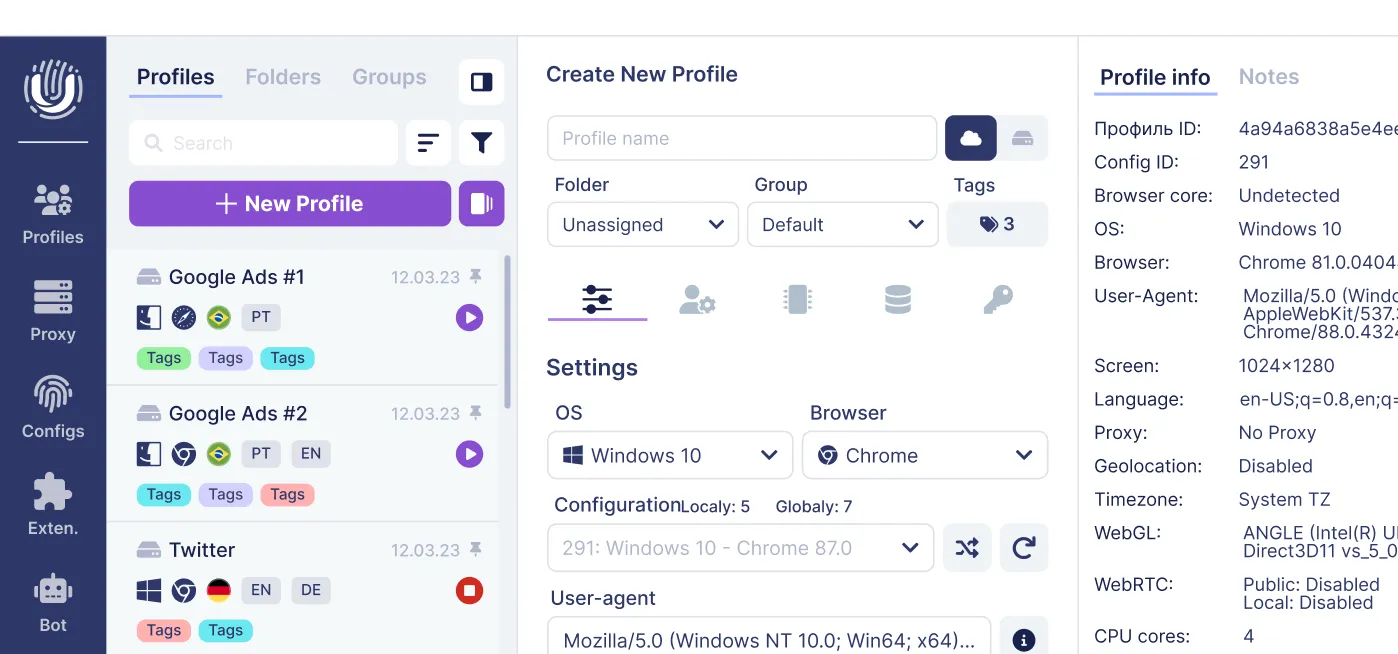
Anti-detect browsers represent the most advanced category of anti tracker software. They create isolated browser profiles, each with a different, realistic digital fingerprint, so that platforms cannot link separate accounts to one person or device.
Unlike typical anti tracking tools that simply block trackers, anti-detect browsers make each profile look like a unique, regular user device. Instead of hiding you, they give each session a distinct and believable identity. Specific fingerprint parameters these browsers can tune include User-Agent, timezone, language, WebGL and canvas rendering, audio context, fonts, screen resolution, hardware concurrency, and more.
Undetectable.io's core proposition centers on control and data ownership. On any paid pricing plan, you can create unlimited local profiles - the only limit is your disk space. Profiles are stored on your own device, not on remote servers, giving you full control and reducing the risk of leaks. The browser supports windows 64-bit and macOS 12+ (Intel and Apple Silicon). You can download Undetectable and start with a free plan immediately.
Key features relevant to anti tracking include profile mass creation, proxy management per profile, a cookies robot for automated warm-up (visiting benign sites to build believable browsing history), cloud/local sync, and API access for team automation. These capabilities matter for digital marketers, affiliate and traffic arbitrage professionals, social media managers, and e-commerce sellers running dozens of Google, Facebook, TikTok, or Amazon accounts.
Anti-detect browsers should be used ethically and in accordance with platform terms. But they provide a high-control environment where online trackers cannot easily connect all accounts to one digital fingerprint - which is exactly what professionals need to stop tracking across their operations.
Key features to look for in any anti tracking software
When evaluating any anti tracker, use this practical checklist:
Blocking capabilities:
- Ability to block ads (banners, video, and in-feed), tracking scripts, third party cookies, and advanced fingerprinting attempts
- Anti-trackers improve page loading speed by blocking trackers and advertisements, so effective blocking directly improves user experience
- A user dashboard or tracking dashboard showing the number of blocked requests per session
Fingerprint protection:
- Options to randomize or standardize fingerprint data across sessions
- Protection against canvas, WebGL, and audio fingerprinting
- Masking of system fonts, plugins, and hardware details
Privacy essentials:
- Local data storage instead of cloud when possible
- Transparent privacy policy with no resale of behavioral data
- Minimal telemetry - the tool should not become a tracker itself
Usability:
- Per-site controls and whitelisting
- Presets (Standard/Strict modes) for non-technical users
- Regular updates to counter new fingerprinting vectors
Compatibility:
- Support for major browsers (chrome, firefox, Edge) or built-in Chromium engine
- Ability to coexist with VPNs, proxies, or corporate security suites
For Undetectable.io specifically: unlimited profiles on any paid plan, strong proxy integration, profile export/import, API access for multi-accounting efficiency, and the advantage of local profile storage for confidentiality. You can audit your fingerprint before and after configuring profiles to verify your setup works.
Building your anti tracking stack: practical scenarios
No single anti tracker covers every risk. Users can combine privacy tools for better online safety and control, building a stack based on their threat model and goals.
Everyday user stack: A privacy-focused browser (Firefox with Enhanced Tracking Protection or Brave) plus one anti tracker extension like uBlock Origin or Privacy Badger, plus an optional reputable VPN. This handles the majority of casual tracking. The combination of an antitracker and a VPN can enhance online privacy significantly for most people.
Remote worker / freelancer stack: A hardened browser with strict anti tracking settings, a DNS-level blocker at router or OS level, a VPN for public wi fi connections, and careful separation of work and personal accounts across different browser profiles. This prevents cross-contamination between professional and personal web activity.
Professional marketer / affiliate arbitrage stack: Undetectable.io anti-detect browser with separate profiles per project or client, a residential or mobile proxy per profile, ad and tracker blocking extensions inside each profile, and possibly an OS-level blocker for extra safety. Use the cookies robot to warm up profiles with believable browsing history, and leverage the API for bulk operations.
Avoid over-stacking: too many blockers running simultaneously can break sites, trigger CAPTCHAs, or slow your workflow. Start minimal and increase protection as needed. Test your setup using tools like Panopticlick to visualize your digital fingerprint and verify that detected trackers decrease after configuring your stack.
Businesses benefit from documented setups - playbooks that ensure every team member uses consistent anti tracking configurations across all individual websites and accounts.
Limitations, risks, and legal considerations of anti tracking
Anti tracking improves privacy, but it is not a magic invisibility cloak. Stay informed about what these tools can and cannot do.
Technical limits are real: large platforms with centralized accounts (Google, Meta, Amazon) can still correlate behavior through login data. Fingerprint randomization that produces unrealistic or internally inconsistent parameters may itself become a detectable signal and trigger additional verification. Some websites' terms of service restrict certain kinds of automation, scraping, or multi-accounting, even if technically possible.
Anti tracking does not prevent all data breaches or phishing. Users still need strong passwords, two-factor authentication, and basic security hygiene. Stricter anti tracking modes may break websites, disable single sign-on flows, or interfere with streaming and banking apps. Some desktop tools offer a trial period, so test usability before committing.
We encourage readers to use Undetectable.io and other anti tracking tools for legitimate purposes: privacy, account security, marketing workflows, and testing - not for fraud or abuse. Regulations like GDPR and CCPA focus on how companies collect and process data. Using anti tracking on the user side is generally legal, but it must not be mixed with illegal activities.
Conclusion: choosing the right anti tracker for your privacy and business needs
Tracking in 2026 relies heavily on digital fingerprinting - 70% of websites track their visitors, and 99% accuracy allows companies to identify users online with over 3,000 bits of personal information that exist online without consent. Modern anti tracking must go beyond simple ad blocking to address this reality.
For most individuals, a secure browser paired with a solid extension delivers meaningful protection. Families and small offices benefit from system-wide desktop blockers. But for professionals managing multiple accounts across platforms - where a single linked fingerprint can mean banned accounts and lost revenue - anti-detect browsers are essential.
Undetectable.io stands out as the go-to choice for users who need fine-grained control over fingerprints, multi-account isolation, automation, and proxy management while keeping all profiles stored locally on their own device. If you want to protect your online identity and see how your digital fingerprint changes across sessions, start with Undetectable.io's free plan on Windows or macOS, create a few profiles, and measure the difference yourself.
Related posts
View all articlesJoin 450,000+ users who chose Undetectable
- Advanced anti-detection technology
- Unlimited local profiles from $49
- The perfect solution for multi-accounting