Guides
Anon search: how to browse anonymously and protect your data
Anon search: how to browse anonymously and protect your dataGuides
True online anonymity goes far beyond opening an incognito window. Here is everything you need to know about anon search in 2026, from choosing the right search engine to building a full privacy stack.
Answer first: what "anon search" really means in 2026
Anon search means performing search queries without linking them to your real-world identity, ip address, or any long-term behavioral profile. The goal is to prevent the search provider from connecting queries to a persistent user profile. However, a private search engine alone does not hide all browsing activity from an ISP, network administrator, or destination websites.
There are three distinct levels of protection, and most people confuse them:
- A privacy-focused search engine generally avoids maintaining a personally identifiable search history or using queries to build advertising profiles. Specific logging and retention practices vary by provider.
- Incognito mode in Google Chrome, Firefox, or Edge clears local browsing history and site data when you close the window. It does not hide your ip address or stop websites you visit from tracking you. Google in incognito mode is not anon search.
- Layered anonymous browsing combines a private search engine with a VPN to mask your ip address, an anti-detect browser to randomize your fingerprint, and encrypted DNS to close remaining gaps. This is the approach that genuinely minimizes digital footprints linked to personal data.
A common myth: seeing no targeted ads does not mean no tracking. Contextual ads can appear without profiling, while invisible trackers still collect data behind the scenes. Anonymous searching helps avoid data profiling by search engines and advertisers, and it can protect sensitive searches from data breaches.
The regulatory landscape is shifting-GDPR, CCPA, and the EU Digital Markets Act are tightening rules-but major tech companies and data brokers still aggressively harvest personal data through fingerprinting and cross-device correlation.
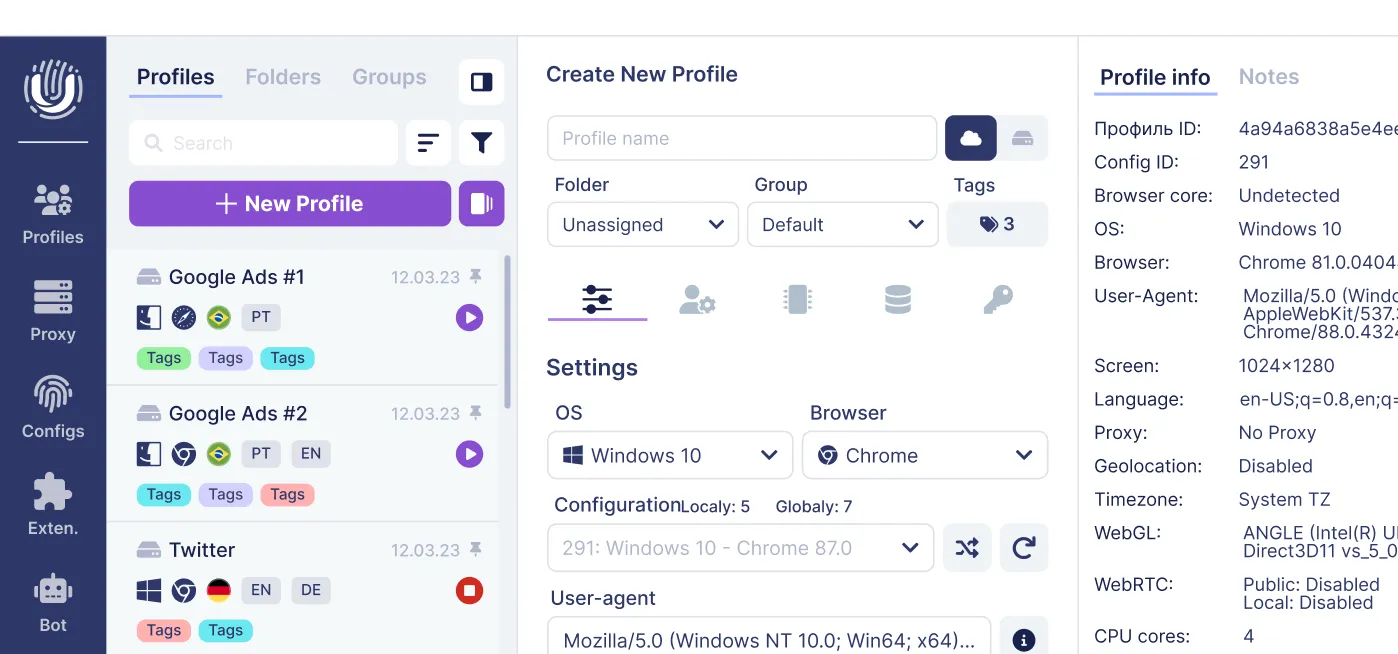
For marketers and teams managing multiple accounts, Undetectable.io is built to pair with anon search. It isolates browser profiles with unique fingerprints and dedicated proxies, keeping every persona separate.
How private search engines differ from mainstream search
A private search engine commits to no long-term logs tied to identity, no behavioral ad targeting, minimal cookies, and a transparent privacy-first business model. Private search engines do not track user data, do not store search histories, and use encryption to protect user data. The result: users experience fewer targeted ads compared to traditional search engines.
Mainstream search engines like Google, Bing, and Yahoo operate differently:
- They log ip addresses, search terms, device metadata, and click behavior.
- They create user profiles used to serve targeted ads and personalize search results.
- They store user data indefinitely unless a user manually deletes it, and even deletion is not always complete.
- They share aggregated or individualized data with advertising partners for advertising purposes.
Privacy focused search engines counter this with concrete mechanisms:
- Non-personalized, unbiased results-the same query returns the same results for everyone.
- Full HTTPS encryption between your browser and their servers.
- No re-use or resale of query data; no storing personal data tied to accounts.
- Some offer proxy modes so that clicking a result does not expose your identity to the destination site.
Specific examples include DuckDuckGo (popular, no search history logging), Startpage (Google results via privacy proxy, EU-based), Brave Search (its own index, independent from big tech), Swisscows (Swiss jurisdiction, family friendly), Mojeek (own crawler, UK), and SearXNG (open source metasearch engine).
The tradeoff is real: private engines sometimes lag on local or hyper-niche queries, and the absence of personalization means results may feel less immediately relevant. But the search experience is consistent and free from the filter bubble that other search engines create.
Key features to look for in an anon search / private search engine
Not every search engine advertising "private" delivers equal protection. Before you switch, verify actual features-not marketing slogans.
Privacy essentials:
- Strict no-logs or minimal-logs policy: the engine should not retain search queries, ip addresses, or device identifiers tied to a user account
- No behavioral ad targeting or user profiling-contextual ads are acceptable, but building advertising profiles is not
- Full HTTPS plus DNS-over-HTTPS to prevent middle-man snooping on your search bar activity
- Private search engines enhance data security for users, but only when these features are genuinely implemented
Usability and quality:
- A solid independent index (like Brave Search or Mojeek with its own index) or credible metasearch pulling from diverse upstream sources
- Relevant local results without requiring precise GPS or storing other personal data
- Support for images, video, maps, and news-not just web links
Advanced options:
- "Anonymous view" or proxy view for visiting search results without exposing your identity to other sites
- Built-in tracker protection and referrer stripping
- Family friendly filters for shared devices, workplaces, or younger users
Jurisdiction and trust:
- Engines based under strict European privacy laws (GDPR) or Swiss data protection carry stronger legal guarantees
- Transparency reports, third-party audits, and open-source code (like SearXNG) are concrete trust signals
- Private search engines provide unbiased results precisely because they lack the commercial incentive to manipulate rankings
Anon search vs. incognito mode: what really happens to your data
Incognito mode in browsers like Google Chrome, Edge, Firefox, and Safari is a local privacy feature, not an anonymity tool. Understanding the difference is critical before you rely on it for a private search experience.
What incognito mode does:
- Clears browsing history, third party cookies, and form data when the window closes
- Keeps online activity hidden from other users on the same device
- Useful on shared or public computers where you do not want the next person to see your search history
What incognito mode does not do:
- Does not hide your ip address from websites you visit, your ISP, or your employer's network. Incognito mode does not hide activity from your Internet Service Provider or websites.
- Does not prevent browser fingerprinting, which tracks devices via browser configuration, screen resolution, installed fonts, and operating system details
- Does not stop logged-in services (Google, Facebook, Amazon) from linking user activity to your account. User privacy can be compromised by logging into personal accounts during anonymous sessions.
Combining a private search engine with incognito is better than using Google in incognito-your queries are not logged upstream-but your ip address and fingerprint are still exposed.
This is where an anti-detect browser goes further. Undetectable.io isolates each session into a separate profile with randomized fingerprints and dedicated proxies-something standard incognito cannot do. True anonymity requires managing browser fingerprints and avoiding account logins, which is exactly what this kind of tool is built for.
Popular privacy focused search engines (and how they handle anonymity)
Anon search starts with choosing the right search engine. Each alternative below handles anonymity differently, with distinct tradeoffs in result quality, independence, and data protection.
- DuckDuckGo: The most widely recognized private search engine. DuckDuckGo processes over 100 million searches daily without tracking. It does not log search history or build user profiles. Results come from Bing, its own crawler, and other sources. Ads are contextual (based on the current query, not your profile). It offers browser extensions and mobile apps with built-in tracker protection. DuckDuckGo can be added as a default search engine in Chrome and other browsers.
- Startpage: Founded in 2002 and based in the Netherlands, Startpage acts as a privacy proxy for Google's index. Your queries reach Google anonymously, and Startpage's "Anonymous View" lets you visit results through a proxy so destination websites never see your real ip address. Startpage operates under strict European privacy laws and adheres to EU privacy regulations, making it a strong choice for users who want Google-quality results without the tracking.
- Brave Search: With 50 million daily active users, Brave Search runs its own index independent of Google and Bing-making it the only search engine on this list with full index independence plus mainstream adoption. It integrates deeply with the Brave browser and offers unique features like Goggles for custom ranking filters. The brave rewards program provides optional, privacy-respecting ads. Anonymous usage metrics can be disabled entirely. Brave Search can be accessed through various browsers, not just Brave.
- Swisscows: A family friendly search engine that blocks adult content by default. Swisscows operates under strict Swiss data protection laws and does not store or share user data. It does not track user activity or store data of any kind. Swisscows offers its own index supplemented by partnerships. To switch to Swisscows, follow browser-specific instructions for your platform.
- SearXNG / MetaGer: Open-source or non-profit metasearch engines. SearXNG aggregates results from dozens of upstream sources and can be self-hosted for maximum control. MetaGer, run by a German non-profit, operates its own data centers powered by renewable energy. Both are popular with advanced users who want full transparency. The tradeoff: UI polish varies across public instances.
- Mojeek: UK-based with its own crawler and over 6 billion pages indexed. Mojeek is ad free and focused on neutrality-no third party trackers, no profiling. Its index is smaller than Google's, so niche queries may return fewer results, but its independence from big tech is unmatched.
- Ecosia: While not primarily a privacy search engine, Ecosia has planted over 215 million trees since 2009, making it a compelling choice for environmentally conscious users. It uses Bing's index and has improved its privacy stance, though it is not as strict as the best search engines listed above.
You can switch search engines in Chrome, Firefox, and Edge through browser settings. Safari does not allow adding custom search providers, which limits options on Apple devices.
Family friendly anon search: safe results for kids and workplaces
A family friendly search engine blocks violent, pornographic, or otherwise age-inappropriate content by design-not just through optional filters that users can toggle off.
This matters for:
- Parents setting up a search bar on shared home devices where younger users browse unsupervised
- Schools and libraries needing a default-safe private search experience without requiring individual account configuration
- Businesses and public institutions needing compliance with content policies and reputation protection
Key options:
- Swisscows is explicitly designed for family friendly search, blocking adult content at the engine level. It pairs strong Swiss data protection with content safety.
- Qwant Junior is built specifically for children, with strict content filters enforced by default.
- Google SafeSearch is optional and account-based-not always enforced in incognito mode or on unmanaged devices, making it less reliable.
Practical configuration steps:
- Force family friendly search at the router or DNS level (e.g., using safe DNS providers) so it cannot be bypassed on individual devices
- Pair content filters with a private search engine to protect both safety and privacy simultaneously
- Teach kids the limits: search privately does not mean permission to bypass rules or the law
Undetectable.io is designed for professional multi-accounting, not for children. But organizations can use anon search engines alongside endpoint controls to ensure both privacy and content safety across their networks.
Anon search in practice: combining private search, VPNs, and anti-detect browsers
No single search engine, VPN, or browser alone delivers reliable anonymity. Effective anon search is layered, with each tool covering a gap the others leave open. Combining different privacy tools and practices enhances online anonymity far beyond what any single tool provides.
A typical anonymous browsing stack:
- A private search engine to prevent query-level profiling and ensure your searches remain private
- A VPN or secure tunnel to hide your ip address from websites and ISPs, masking your geographic location and reducing session correlation. VPNs can show a different IP address but do not guarantee anonymity on their own.
- An anti-detect browser like Undetectable.io to randomize browser fingerprints and keep multiple identities isolated in separate profiles
- Encrypted DNS (DoH or DoT) so ISPs cannot see queried domain names. Using HTTPS encrypts the connection between your browser and the website, closing another data leak.
- Tracker-blocking tools and browser extensions that strip referrers and block third party cookies
How Undetectable.io fits:
- Unlimited local profiles on any paid plan-create hundreds without server-side storage
- Per-profile proxy assignment so each identity uses a different ip address from a different location
- Unique, realistic fingerprints per profile to prevent correlation across accounts
Concrete use cases:
- An affiliate marketer running dozens of ad accounts across regions, each needing to appear as a distinct local user with no overlap in fingerprint or browsing history
- A research team separating test personas to check search results and SERP placement across geographies without polluting results with their personal online activity
Multi-accounting and anon search for marketers, affiliates, and SMM teams
In 2026, platforms like Google Ads, Facebook, TikTok, and Amazon use fingerprints, IP reputation, cookies, and behavioral signals to detect linked accounts. Digital marketers, ad arbitrage specialists, and social media managers need both anon search and robust multi-account separation to protect campaigns and revenue.
Typical challenges:
- Platforms correlating accounts through shared fingerprints, overlapping cookies, or identical ip addresses
- Ad networks flagging and suspending multiple accounts originating from the same environment
- Need to research competitors, keywords, and offers through alternative search engines without contaminating personal profiles or biasing search results
How Undetectable.io supports these workflows:
- Anti-detect browsing masks and diversifies fingerprints across every profile, so each account appears to belong to a separate person
- Proxy management assigns geo-specific IPs per profile for localized search and campaigns
- Cookies bot warms up new profiles with realistic browsing history, reducing suspicion when accounts are freshly created
- Mass profile creation via API scales operations to hundreds or thousands of identities
Ad and traffic arbitrage scenarios:
- Testing creatives and landing pages from U.S., European, and Asian perspectives without your personal search history skewing results
- Validating tracking links and redirects through privacy search engines to see what real users see
Team features that matter:
- Syncing cloud and local profiles across devices for distributed teams
- API and automation for bulk management
- Keeping client projects isolated so identities and data never leak across environments
Practical checklist: how to browse anonymously day-to-day
Anon search must become a daily routine, not a one-time setup. Anonymous searching minimizes digital footprints linked to personal identity only when you follow through consistently.
-
Set a privacy focused search engine (Startpage, DuckDuckGo, Brave Search, or Swisscows) as your default search engine in every browser you use
-
Always use HTTPS. When researching sensitive topics-health, finances, politics-add a VPN to mask your ip address
-
Never log into Google, Facebook, or other real-name accounts during anonymous sessions. This single mistake can undo every other precaution.
-
Regularly clear cookies and site data, or use ephemeral browser profiles for sensitive research
-
Disable unnecessary browser extensions, autofill, and cross-device sync-these leak identifiers that compromise your fingerprint
-
Use separate browser profiles or an anti-detect browser for different personas: work, personal, experimental
-
For professionals, integrate Undetectable.io with proxies and automation tools to keep campaigns and accounts cleanly separated
-
Test your setup: use fingerprint-checking tools to verify that each profile presents a distinct identity
-
Avoid reusing usernames, email addresses, or phone numbers between anonymous and non-anonymous profiles
-
Keep your operating system, browser, and security tools updated to close exploit vectors
The ad free experience of a private search engine means nothing if you log into Gmail in the same session.
Limits of anon search and how Undetectable.io fits into a long-term privacy strategy
True 100% anonymity is extremely hard. Anon search reduces risk substantially, but it does not make you invisible. Being honest about limits is the first step toward more control over your data.
Realistic limitations:
- Advanced fingerprinting techniques-TLS fingerprints, HTTP/2 frame headers, behavioral patterns-can still correlate user activity over time, even with strong browser-level spoofing
- Law enforcement and courts can compel data from ISPs or VPN providers in some jurisdictions, regardless of no-logs claims
- A single mistake-logging into a personal account, reusing an email, overlapping proxies-can undo layers of protection instantly
- Tor Browser routes traffic through a multi-layered encrypted network for anonymity, but it is slow and often blocked by websites
How to mitigate these risks:
- Choose reputable VPNs and best search engines with proven, court-tested privacy histories
- Never reuse identifiers (emails, phone numbers, usernames) between anonymous and non-anonymous profiles
- Keep all software updated to reduce fingerprint drift and exploit risk
- Use anti-detect browsers that handle more control at the TLS and network level, not just JavaScript spoofing
Where Undetectable.io fits:
- Isolates activities into separate, hardened profiles with unique fingerprints
- Keeps local data on your machine by default-no central server stores your fingerprints or browsing data
- Scales to hundreds or thousands of profiles for long-term, professional multi-account management
- Pairs with any private search engine to deliver a genuinely separated search experience per identity
Anon search is not a product you buy once. It is a discipline you practice daily, combining the right tools with consistent habits. For professional multi-accounting, start by testing Undetectable.io's free tier to see how fingerprint isolation, proxy management, and profile warm-ups work in practice-then build your full privacy stack from there.
Related posts
View all articlesJoin 450,000+ users who chose Undetectable
- Advanced anti-detection technology
- Unlimited local profiles from $49
- The perfect solution for multi-accounting